

You’ve been curious about smart home devices for a while now. Maybe a friend showed you their lights turning off automatically when they left the room, or you saw a Ring doorbell ad and thought — yeah, I’d actually use that. So you did what any reasonable person does: you Googled it.
And then you drowned. Zigbee hubs, Z-Wave protocols, mesh networks, Matter certification, Alexa vs. Google Home debates that read like sports arguments. After 20 minutes of research you closed the tab and went back to your regular light switches.
I’ve been there. This post is the version of that research I wish had existed. No jargon, no assumptions, no “just spin up a Raspberry Pi” energy. Just six specific devices, real prices, and a clear starting point — even if you’ve never set up a single smart device in your life.
- Before You Buy: Pick One Ecosystem (Takes 2 Minutes)
- Device 1: Amazon Echo Dot — Your Voice Control Hub (~$50)
- Device 2: Kasa Smart Plug — Make Any Appliance Smart (~$9–$35)
- Device 3: Smart Bulbs — The “Wow, I Live in the Future” Moment
- Device 4: Wyze Cam v4 — Home Security That Doesn’t Cost a Fortune (~$35)
- Device 5: Ring Video Doorbell — See Who’s at Your Door From Anywhere (~$100)
- Device 6: Google Nest Thermostat — Set It and Save Money (~$130)
- Beginner Starter Packs: 3 Budget Tiers
- Common Beginner Mistakes to Avoid
Before You Buy: Pick One Ecosystem (Takes 2 Minutes)
Here’s the one decision that makes everything else easier: choose a voice assistant before you buy your first device. Think of it as picking a team. Your three options are Amazon Alexa, Google Home, and Apple HomeKit.
Amazon Alexa is what I recommend for most beginners. It works with the widest range of devices, the Echo speakers are affordable, and setup is as close to foolproof as smart home tech gets. If you don’t have a strong reason to pick something else, go Alexa.
Google Home is a close second. The voice recognition is excellent — better than Alexa, honestly — and it integrates naturally with Android phones and Google Calendar. If your life already runs through Google, this is the natural fit.
Apple HomeKit is the right choice if you’re deep in the Apple world (iPhone, iPad, Mac). It’s the most privacy-conscious of the three and the setup is clean, but the device selection is more limited and things tend to cost more.
In 2026, a new standard called Matter has made cross-brand compatibility much better than it used to be. Your Philips Hue bulbs will talk to your Alexa speaker even if they’re different brands. That said, you still get the smoothest experience when most of your gear is built around one app. Pick a team, at least to start.
Device 1: Amazon Echo Dot — Your Voice Control Hub
Amazon Echo Dot (5th Gen)
A hockey-puck-sized speaker with Alexa built in. Plug it into an outlet, connect it to your Wi-Fi in the Alexa app, and you’re done. From that point forward, you can control lights, thermostats, locks, cameras, and everything else on this list — completely hands-free.
I started with an Echo Dot and it genuinely changed how I interact with my home. “Alexa, turn off all the lights” before bed. “Alexa, set the thermostat to 68.” “Alexa, show me the front door camera.” You don’t realize how much these small moments add up until you’re doing them 10 times a day without thinking about it.
The Echo Dot fits any room without taking over it. The 5th gen version has noticeably better sound than its predecessors — good enough to use as a secondary speaker — and the temperature sensor lets you build automations based on room temperature. At $50, it’s the best first purchase in smart home, full stop.
Device 2: Kasa Smart Plug (KP115) — Make Any Appliance Smart
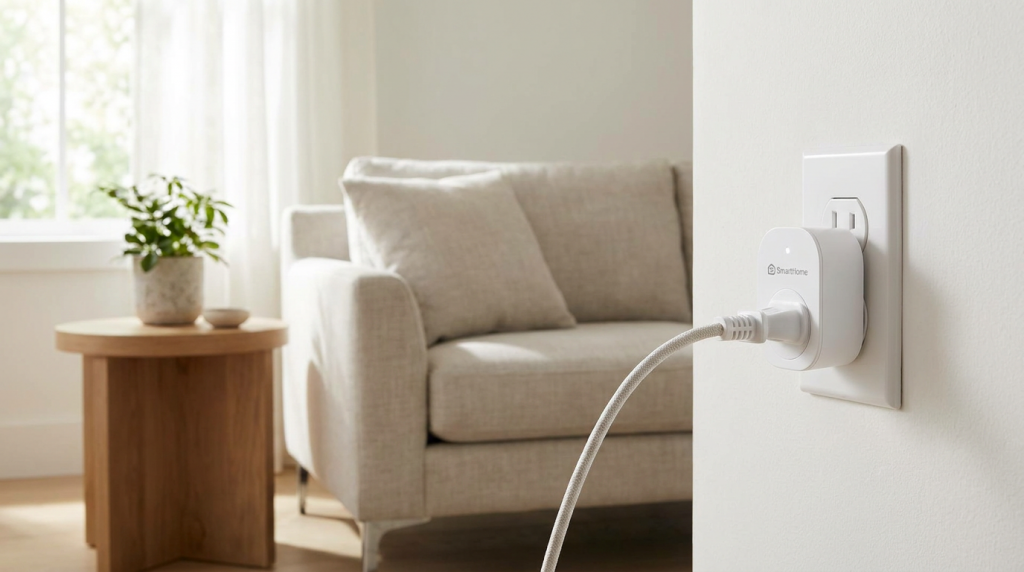
TP-Link Kasa Smart Plug KP115
Plug it into your wall outlet. Plug your lamp, coffee maker, or fan into the smart plug. Now that appliance is smart — schedulable, voice-controllable, and remotely accessible from your phone anywhere in the world.
Smart plugs are the thing that sells people on smart homes. Not flashy smart bulbs, not the fancy doorbell — it’s the moment your coffee maker starts brewing automatically before your alarm goes off. It sounds trivial until it’s your morning.
A 4-pack of Kasa plugs for $35 immediately makes four things in your home smart. Your lamp responds to voice commands. Your holiday lights turn themselves off at midnight. Your space heater can’t accidentally get left on when you leave for work. That’s four real wins for less than the price of dinner out.
The KP115 specifically is worth the slight premium over the cheaper KP105 because it includes energy monitoring. You’ll be surprised to see what’s quietly draining power while you sleep.
Device 3: Smart Bulbs — The “I Live in the Future” Moment
Philips Hue (Quality Pick) or Kasa Smart Bulbs (Budget Pick)
Screw them in exactly like a normal bulb. Download the app. That’s it. From there you can dim them, schedule them, change colors, and control them by voice. No electrician, no ladder, no tools.
Smart bulbs are the gateway drug of smart homes, and for good reason. The moment you say “Alexa, dim the living room to 40%” and the lights respond, something shifts. You go from skeptic to convert in about four seconds.
For budget-conscious beginners, Kasa bulbs are the call. They work reliably with Alexa and Google, support dimming and color temperature, and cost a fraction of Hue. Start with two or three in your main living space to get a feel for it.
If you care about build quality and ecosystem depth, Philips Hue is the gold standard. Their app is excellent, the bulbs are rock-solid, and the ecosystem includes lamps, light strips, and outdoor fixtures when you’re ready to expand. Just know you’re paying a premium for it.
Don’t buy smart bulbs for fixtures you control with a regular wall dimmer switch. Regular dimmers fight with smart bulbs and can shorten their lifespan. Either swap the switch for a smart switch, or make sure the fixture has its own on/off switch and leave the wall switch always-on.
Device 4: Wyze Cam v4 — Home Security That Doesn’t Cost a Fortune
Wyze Cam v4
A compact camera with 2.5K QHD resolution, color night vision, motion alerts, two-way audio, and free local storage via a microSD card. Works indoors or outdoors. Setup is plug-in-and-scan-a-QR-code simple.
Most security cameras at this price range make you feel like you’re compromising. The Wyze Cam v4 doesn’t. The video quality is sharp, night vision actually shows you what’s happening in color (not just grainy black-and-white), and the two-way audio works reliably.
The big differentiator is storage. Many cameras force you into a cloud subscription ($5–$10/month) to save any footage. The Wyze v4 records locally to a microSD card — drop a $10 card in, and you have rolling 24/7 storage for nothing. They do offer a paid subscription for cloud backup and person detection, but it’s optional, not required.
Put one in your living room while you’re away, or point it at your front door from inside. If you want it outdoors, the v4 is weather-resistant enough to handle it.
Device 5: Ring Video Doorbell — See Who’s at Your Door From Anywhere
Ring Video Doorbell (Battery Version)
A camera doorbell that sends your phone an alert the moment anyone approaches your door. You can see them in HD video, hear them, and talk back — whether you’re in your kitchen or 500 miles away.
The Ring doorbell was the first smart home device that made me feel genuinely, practically safer — not just gadget-happy. A package delivery you can redirect. A stranger lingering at the door you can speak to without opening it. A family member arriving that you can buzz in while you’re still at the grocery store.
The battery-powered Ring is the right call for most beginners. No existing doorbell wiring? No problem. No electrician needed. Charge it every two to three months (less often in mild weather), and it just works.
Ring integrates natively with Alexa, so if you have an Echo Show (the version with a screen), your doorbell feed pops up automatically when someone rings. That’s genuinely convenient.
Ring offers free live view and real-time alerts without a subscription. To save recorded video clips and get person detection, you’ll need Ring Protect at ~$5/month per device or ~$10/month for the whole home. It’s optional, but most people find it worth it.
Device 6: Google Nest Thermostat — Set It and Save Money
Google Nest Thermostat
A sleek, wall-mounted thermostat that learns your temperature preferences and adjusts automatically. It knows when you’re home and when you’re away, and stops heating or cooling an empty house — saving you money every single month.
I’ll be honest — the smart thermostat was the last thing I bought, and it’s been one of the most useful. Not because it’s flashy, but because it quietly optimizes your energy use in the background without you thinking about it.
The Nest Thermostat’s installation looks scarier than it is. You turn off the power to your HVAC at the breaker, remove your old thermostat, connect five labeled wires to matching terminals, and snap the Nest onto its mount. The in-app instructions walk you through it step by step. Most people finish in 30 minutes. If you’ve ever changed an outlet cover, you can do this.
Worth mentioning: the slightly pricier Ecobee (around $249) adds room sensors that detect occupancy in multiple rooms — great for houses where one thermostat doesn’t serve the whole space well. For most beginners in a typical home, the $130 Nest is plenty.
Beginner Starter Packs: 3 Budget Tiers
Not sure where to start financially? Here’s how to think about it in three tiers:
| Tier | What You Get | Approx. Cost | Best For |
|---|---|---|---|
| Tier 1 — Starter | Echo Dot + Kasa 4-pack plugs + Wyze Cam v4 | ~$121 | First-timers who want to test the waters before committing |
| Tier 2 — Solid Setup | Everything in Tier 1 + Ring Doorbell + Kasa smart bulbs (3-pack) | ~$250 | Homeowners who want real security and automation |
| Tier 3 — Full Foundation | Everything in Tier 2 + Google Nest Thermostat | ~$380 | Anyone ready to build a home that genuinely runs itself |
Start at Tier 1 if you’re not sure this is for you. The Echo Dot, 4 smart plugs, and a security camera will show you quickly whether smart home tech is worth your time and money. Most people who start at Tier 1 upgrade within three months.
Common Beginner Mistakes to Avoid
- Buying devices from five different brands before picking an ecosystem. This is how you end up with three apps, two hubs, and a headache. Pick Alexa or Google Home first, then buy devices that explicitly support it.
- Buying a hub before you have anything to control. You don’t need a hub to start. Every device on this list works over Wi-Fi, hub-free. Save the hub conversation for when you want to scale to 20+ devices.
- Spending too much too fast. The smart home rabbit hole is deep and it’s easy to drop $500 in a weekend. Start small, see what you actually use daily, then expand. The devices you use every day are the ones worth buying more of.
- Installing smart bulbs in fixtures with regular dimmer switches. This causes flickering, premature bulb failure, and general frustration. See the tip in the bulbs section above.
- Skipping the thermostat because it seems complicated. I put it off for two years. Took 30 minutes to install and started saving me money immediately. Don’t skip it.
The Best Smart Home Is the One You Actually Use
You don’t need to overhaul your entire house to feel the benefit of smart home tech. One Echo Dot and a 4-pack of smart plugs will change your daily routine in ways that surprise you — and they’ll cost you less than a nice dinner.
My honest advice: buy a smart plug this weekend. Plug your coffee maker into it. Set it to start brewing 10 minutes before your alarm. That single, $9 moment is when smart home stops being a gadget hobby and starts being just… how your home works.
After that, the next step will be obvious.